
Aora WACRM
FeaturesPricingBlogHelpContact
Browse all help topics
Help Center home
Getting started
Chat tabs
Contacts and CRM
  • Customer profile and sales CRM
  • Notes and activity log
  • Organise contacts with tags
  • Block numbers with the blacklist
  • Import and export contacts
  • Group contacts by company
Pipeline and follow-ups
Messaging tools
AI and translation
Integrations
Team and reports
Account and billing
Privacy
Help Center home
Getting started
Chat tabs
Contacts and CRM
  • Customer profile and sales CRM
  • Notes and activity log
  • Organise contacts with tags
  • Block numbers with the blacklist
  • Import and export contacts
  • Group contacts by company
Pipeline and follow-ups
Messaging tools
AI and translation
Integrations
Team and reports
Account and billing
Privacy
Help Center / Contacts and CRM

Organise contacts with tags

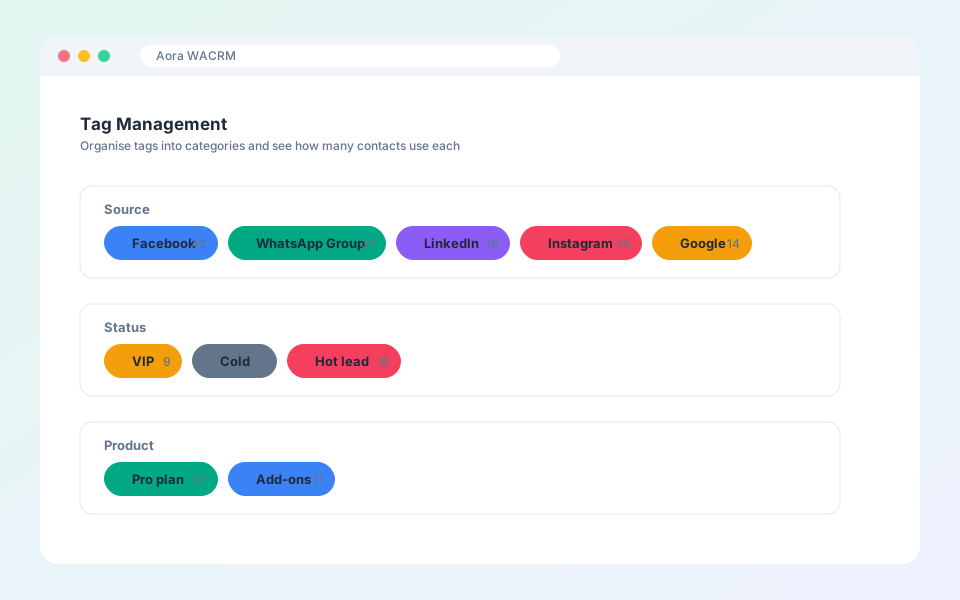
Categories, tags and usage counts.
Organise contacts with tags

Tags group contacts for filters, broadcasts and reports.

Steps

  1. Open Contacts, then Tag Management in the dashboard.
  2. Create a category such as Source or Status.
  3. Add tags to the category and pick a colour.
  4. Apply tags from a contact profile or in bulk from the contacts list.
Tip: The count next to each tag shows how many contacts use it.

Updated October 19, 2026

PreviousNotes and activity logNextBlock numbers with the blacklist

Did not find what you need?

All help topicsContact support
Aora WACRM

AI Messaging CRM with Auto Translation + Integrations

Product

FeaturesPricingBlogHelp

More extensions

Aora WACheckerAora WhatsApp Backup

Company

ContactTermsPrivacy

© 2026 Aora WACRM. All rights reserved.

Terms of ServicePrivacy PolicyContact[email protected]

Not affiliated with, endorsed by or sponsored by WhatsApp or Meta. All product names, logos and brands are property of their respective owners.