
Aora WACRM
FeaturesPricingBlogHelpContact
Browse all help topics
Help Center home
Getting started
Chat tabs
Contacts and CRM
Pipeline and follow-ups
Messaging tools
AI and translation
Integrations
Team and reports
Account and billing
  • Choose or change your plan
  • Buy add-ons
  • Connected devices
Privacy
Help Center home
Getting started
Chat tabs
Contacts and CRM
Pipeline and follow-ups
Messaging tools
AI and translation
Integrations
Team and reports
Account and billing
  • Choose or change your plan
  • Buy add-ons
  • Connected devices
Privacy
Help Center / Account and billing

Buy add-ons

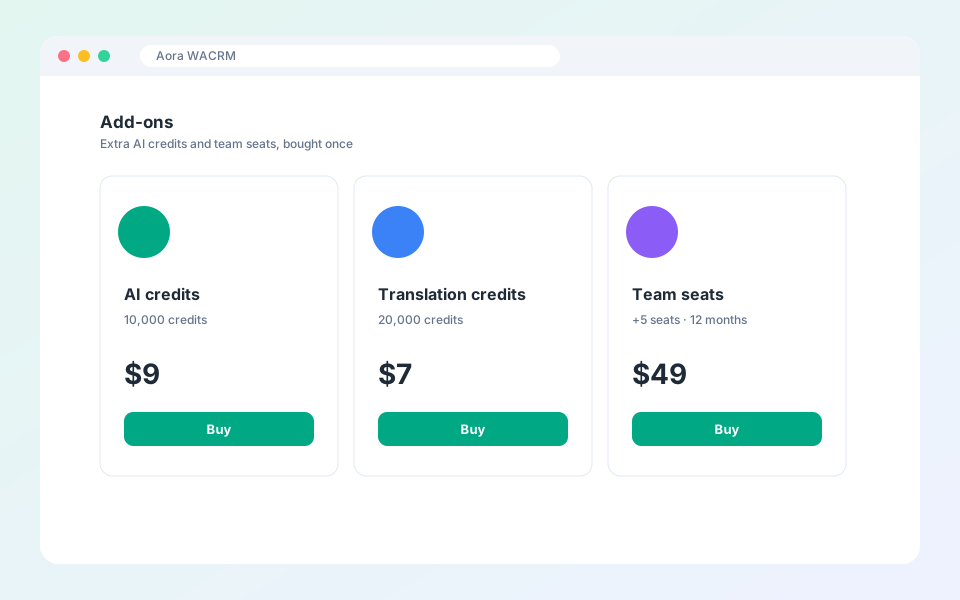
Extra AI credits and team seats.
Buy add-ons

Add-ons extend your plan without changing it.

Steps

  1. Open Plans and scroll to Add-ons.
  2. Choose a credit pack or team seats.
  3. Select the quantity and pay.
  4. The credits or seats appear in your workspace after the payment is confirmed.

Updated October 19, 2026

PreviousChoose or change your planNextConnected devices

Did not find what you need?

All help topicsContact support
Aora WACRM

AI Messaging CRM with Auto Translation + Integrations

Product

FeaturesPricingBlogHelp

More extensions

Aora WACheckerAora WhatsApp Backup

Company

ContactTermsPrivacy

© 2026 Aora WACRM. All rights reserved.

Terms of ServicePrivacy PolicyContact[email protected]

Not affiliated with, endorsed by or sponsored by WhatsApp or Meta. All product names, logos and brands are property of their respective owners.